Website Performance: Winning the LCP game
Largest Contentful Paint measures the time from when the user initiates loading the page until the largest image or text block is rendered within the viewport. This should be under 2.5 seconds for at least 75% of page visits.
What is LCP?
It would seem that simply loading a smaller image would solve the issue, but that might actually have a negligible effect. Let’s dive a bit deeper to see why that might be.
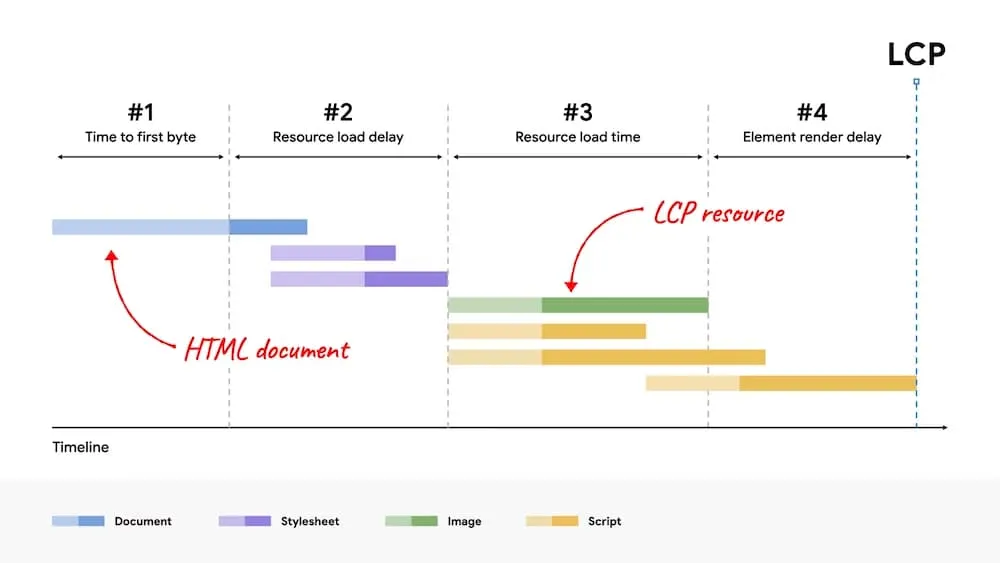
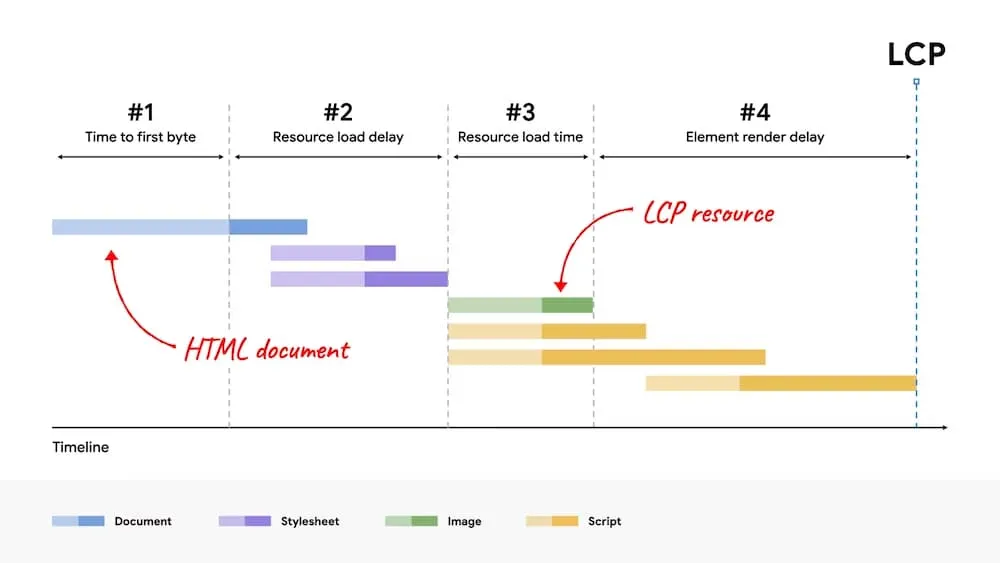
The total LCP time can be broken into four parts:
- Time to first byte (TTFB)
- Resource load delay
- Resource load time
- Element render delay
Depending on what is causing our element render delay, reducing the Resource Load Time by loading a smaller image will have no effect on overall LCP time. (Loading a smaller image doesn’t do any good if it still has to wait for something else to actually display it on the page)
How can we improve it?
If we are already loading optimized images, the two main focus areas for improving our LCP time are the Resource Load Delay and the Element Render Delay.
Resource Load Delay
The goal in this step is to ensure the LCP resource starts loading as early as possible. A good rule of thumb is that your LCP resource should start loading at the same time as the first resource loaded by that page. To tell the browser to fetch our LCP image as soon as possible, thereby reducing our load delay, we can use the fetchpriority attribute.
<img fetchpriority="high" src="/path/to/hero-image.webp">Element Render Delay
The primary reason the LCP element wouldn’t be able to render immediately after its resource finishes loading is if rendering is blocked for some other reason:
- Rendering of the entire page is blocked due to stylesheets or synchronous scripts in the
<head>that are still loading. - The LCP resource has finished loading, but the LCP element has not yet been added to the DOM (it’s waiting for some JavaScript code to load).
- The element is being hidden by some other code, such as an A/B testing library that’s still determining what experiment the user should be in.
- The main thread is blocked due to long tasks, and rendering work needs to wait until those long tasks complete.
For ideas on tackling these issues, read more at https://web.dev/optimize-lcp/#2-eliminate-element-render-delay.
Resource Load Time (image optimization)
Optimization
I like to use ImageOptim to optimize images.
Modern Image Formats
To generate modern formats of images, the Squoosh tool is useful. Squoosh also has a CLI version that I recommend.
If you use the CLI version, I’ve found these settings do a decent job:
npx @squoosh/cli --avif '{cqLevel:14, speed:7, sharpness: 3}' your-image.jpgDefault optimization settings for each image format can be found here: https://github.com/GoogleChromeLabs/squoosh/blob/dev/libsquoosh/src/codecs.ts#L284
Using fetchpriority with <picture> elements and modern image formats
<picture> elements allow us to effeciently load different image sizes, orientations, and formats for different screen sizes and devices. All of that functionality can make it a tad confusing on how to put it all together. The below example will load an .avif or .webp image if the browser supports it, otherwise it will default to .jpg. It will also load a differently sized and oriented image depending on the screen size. Once the browser determines which size and format to load, it will fetch it as high priority.
<picture>
  <source media="(min-width: 480px)" srcset="../../assets/img/home/hero/LinenWeave-Header.avif" type="image/avif" />
  <source srcset="../../assets/img/home/hero/LinenWeave-Header-small.avif" type="image/avif" />
  <source media="(min-width: 480px)" srcset="../../assets/img/home/hero/LinenWeave-Header.webp" type="image/webp" />
  <source srcset="../../assets/img/home/hero/LinenWeave-Header-small.webp" type="image/webp" />
  <source media="(min-width: 480px)" srcset="../../assets/img/home/hero/LinenWeave-Header.jpg" />
  <img fetchpriority="high" src="../../assets/img/home/hero/LinenWeave-Header-small.jpg" alt="">
</picture>