Intro to GraphQL
GraphQL: A Generic Overview
GraphQL was created at Facebook in 2012 and became open source in 2015. I know what you’re thinking, GraphQL is just another query language. Alas, it is not! Lean back and let me take you on this brief guided tour of GraphQL. It is common for modern ecommerce platforms and CMSs to use a GraphQL API. Now to begin, GraphQL is a query language AND a server-side runtime for APIs.
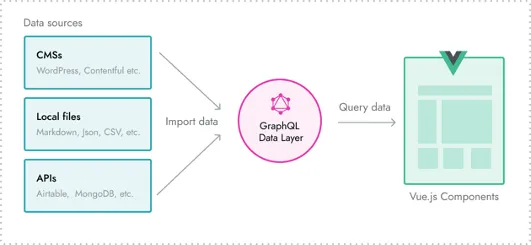
In this particular case, we aren’t talking about how long a program takes to run when we refer to runtime. Instead, when I mention runtime, I am referring to the environment in which a program executes. The runtime for GraphQL occurs in the following sequence:
- Receives request
- Validates request
- Identifies operation (query, mutaiton, or subscription)
- Response
GraphQL vs REST
There are quiet a few differences between GraphQL and REST APIs, but for this overview I am only going to cover a couple basic main points. REST APIs receive HTTP requests and return data as an HTTP response. The request object is defined on the server. In comparison, GraphQL data request are queries and the request object is defined on the client.
For a more in-depth review, consider watching (or reading) this long-ish keynote on GraphQL vs REST and their separate usecases.
Pros of GraphQL
I am guessing if you are still reading this, you are unfamiliar with GraphQL and wish to expand your knowledge. Good for you. We love a life long learner. Depending on your applications, there a lot of pros and cons of GraphQL. It really just depends on the project specs and code approach. Here are some SUPER generic reasons to consider GraphQL:
- Strongly typed schema
- Flexible
- Access data from a single endpoint
- Specific client requests
- Quicker response time
Cons of GraphQL
Alas, we come to the cons of GraphQL. Yes, despite hype, it does have some downsides.
- Possible performance issues based on query parameters
- Meant for larger applications
- Complicated error handling and response status
- Web cache is not easily configurable
- No file upload (separate service is needed like Apollo Client)
The Bones of GraphQL
Query: member of the schema that reads data
# Returns a list of users.
users: [User]

# Returns a single user matching an ID.
user(id: Int!): User
Mutation: member of the schema that modifies data (create, edit, delete)
# Creates a user.
createUser(login: String!, firstName: String!, lastName: String!): User

# Validates the credentials of a user.
authenticate(credentials: Credentials!): Boolean

# Assigns the specified roles to a user.
setRolesToUser(userId: Int!, roles: [Role]!): User
Schema: single-rooted tree with two primary nodes — one for queries, one for mutations
# The root of the schema
root {

  # The root node for all queries
  query: Query {

    # Returns a list of users.
    users: [User]

    # Returns a single user matching an ID.
    user(id: Int!): User
  }

  # The root node of all mutations
  mutation: Query {

    # Creates a user.
    createUser(login: String!, firstName: String!, lastName: String!): User

  }
}
Subscription: enables you to subscribe to events on the server
  subscription {
    online_users {
      id
      last_seen
      user {
        name
      }
    }
  }
}
BigCommerce GraphQL API
The eccomerce platform BigCommerce uses GraphQL to get server-side data to power the front end. Developers interact with the data via the built-in framework Stencil. We currently are building the Malouf VIP site using BigCommerce. Hence the whole reason for this post! If you are not familiar with BigCommerce, you can test the API Playground. The request structure for the BigCommerce API is fairly simple.
Product request example
query SingleProduct {
  site {
    products (entityIds: [1234]) {
      edges {
        node {
          id
          entityId
          name
          prices {
            price {
              value
              currencyCode
            }
          }
        }
      }
    }
  }
}
Product request response
{
  "data": {
    "site": {
      "products": {
        "edges": [
          {
            "node": {
              "id": "UHJvZHVjdDo0OTE3",
              "entityId": 1234,
              "name": "Pillow",
              "prices": {
                "price": {
                  "value": 129,
                  "currencyCode": "USD"
                }
              }
            }
          }
        ]
      }
    }
  }
}